The Best Money Apps for Kids in 2026
Financial literacy apps have changed the way families talk about money. What used to mean glass jars and coin counting on the kitchen table now happens on a phone screen, with real debit cards, automated allowances, and live investment portfolios. The best money apps for kids in 2026 do more than store pocket money. The best money apps for kids teach children how money actually works before the real world gets the chance to teach them the hard way.
I remember clearly when my eldest asked for a snack at the grocery store and had no idea how much it actually cost. That moment stuck with me. It made me realize that waiting until a child is old enough to open a bank account is waiting far too long. We started searching for a way to teach our kids about finance on their phones, because everything they do is on their phones anyway. That search led me to some of the best money apps available for kids today, and the experience of using them as a family has shaped every recommendation in this guide.
This guide covers the top financial literacy apps for kids in 2026, how to choose the right financial education app for your family, an in-depth BusyKid review, a full Greenlight vs BusyKid breakdown, financial literacy apps for young adults, and answers to the most common questions parents ask. If you want to pair these apps with a structured allowance system, start with our complete kids allowance guide before diving into the app comparisons below.
Quick Comparison: Top 5 Best Money Apps for Kids in 2026
| App | Best For | Monthly Cost | Ages | Debit Card |
| BusyKid | Chore-based families | $3.99/mo (family) | 5 to 17 | Yes (Visa) |
| Greenlight | Investing and controls | $5.99 to $14.98/mo | All ages | Yes (Mastercard) |
| Acorns Early | Interactive learning | $5/mo (family) | 6 to 18 | Yes (Visa) |
| Modak | No-fee simplicity | Free | 6 to 18 | Yes (Visa) |
| Step | Teens building credit | Free | 13 to 18 | Yes (Visa) |
How to Choose the Right Financial Literacy App for Your Child
Not every financial education app is built the same way. Choosing the best money apps for kids depends on your child’s age, your family’s goals, and how involved you want to be day to day. According to the Consumer Financial Protection Bureau, children who practice real money decisions early develop stronger financial habits as adults. These four areas matter most when comparing financial literacy apps.
Age Appropriateness
The best money apps for kids fall into three age brackets based on what children are ready to learn. The best money apps for kids ages 6 to 10 focus on chores, saving goals, and basic spending with parental oversight. Apps for ages 11 to 17 introduce investing, budgeting, and more independence. Financial literacy apps for young adults, covered in a dedicated section below, focus on credit building, real bank accounts, and full financial independence.
Core Features to Compare
- Chore and allowance automation so parents are not manually sending payments each week
- Debit card controls and spending limits with parental alerts on every transaction
- Savings tools and goal tracking that give kids something concrete to work toward
- Investing features, typically available for children aged 13 and older
- Parent dashboard with the ability to freeze the card or override purchases instantly
Cost and Fee Structures
Most of the best money apps for kids charge between $3.99 and $14.98 per month depending on the tier and number of children. Before signing up, check for card load fees, ATM withdrawal charges, and reload costs on top of the subscription. Some financial literacy apps offer a free tier with reduced features, which is worth testing before you commit to a paid plan.
Security and Safety
FDIC insurance backing protects funds if the provider fails. Parental override controls and the ability to instantly freeze a card are non-negotiable in any financial education app. If your child is under 13, the app must also be COPPA compliant, meaning it meets US federal standards for children’s online privacy. The FDIC covers deposits up to $250,000 per depositor, per insured bank.
BusyKid Review 2026: The Chore-Based Financial Literacy App for Families
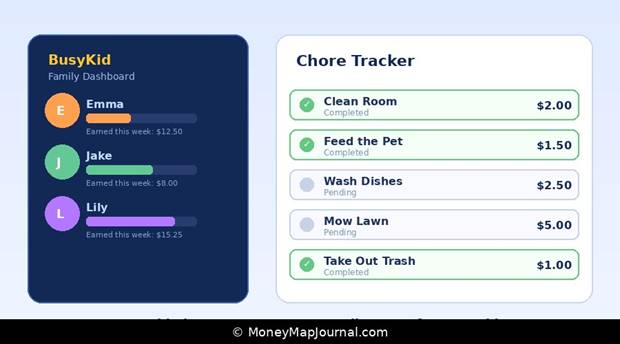
BusyKid chore app dashboard — family view with kids and chore tracker
What Is BusyKid?
BusyKid is one of the most searched financial literacy apps in 2026. Its brand cluster pulls over 900 monthly searches across terms like busykid app, busykid chore app, and busykid debit card. As one of the best money apps for kids, it is built around chore tracking and automated allowance payments, available for children aged 5 to 17 on iOS and Android. The family plan costs $3.99 per month and covers up to five children. You can explore the full feature list on the official BusyKid website.
The core idea behind this financial education app is simple. Parents assign chores, set a pay rate for each task, and BusyKid automatically transfers the earned amount to the child’s account on a weekly schedule. Kids can then split their earnings between spending, saving, giving, and investing, which maps directly onto the three-jar money system many families already use.
BusyKid Chore App: Automating Allowance
The BusyKid chore app is what most parents come for when they discover this financial literacy app. Assigning tasks is straightforward. You choose from a library of preset chores or create your own, set a dollar value, and pick which child it applies to. Once a chore is marked complete, the payment processes automatically on the scheduled pay day.
The parent dashboard gives you a clear view of what each child is earning and how they are spending it. You can add bonus payments for exceptional effort or pause a child’s account entirely if needed. For families who want to stop manually handing over cash every Sunday, this feature alone makes the BusyKid chore app worth the monthly cost.
The BusyKid Debit Card
The BusyKid debit card runs on the Visa network, which means it is accepted at any retailer that takes Visa. Activation takes a few minutes through the app. Spending limits are set by the parent, and every transaction triggers an alert to your phone in real time.
Parents can freeze the BusyKid card at any time directly from the dashboard. ATM access is available, though some fees may apply depending on the network. The card is FDIC insured through Sunrise Banks, N.A., which gives parents confidence that the funds are protected. This makes the BusyKid debit card one of the safer options among the best money apps for kids available today.
BusyKid Reviews: What Parents Are Saying
BusyKid holds a strong rating across the App Store and Google Play, typically between 4.5 and 4.7 stars. BusyKid reviews from parents consistently praise the chore automation and the ease of the allowance system. The most common complaint in BusyKid reviews is that the investing feature is limited compared to Greenlight at a similar price point. Some parents also note the app interface is less polished than competitors. BusyKid has addressed interface concerns in recent updates, and for families who prioritize chore tracking over investment tools, it remains the top financial literacy app pick.
Greenlight vs BusyKid: Which Financial Literacy App Wins in 2026?
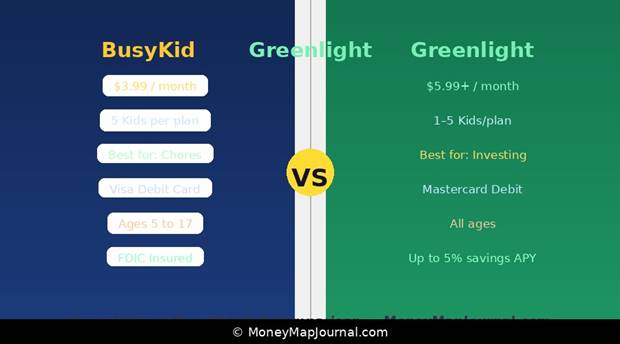
Greenlight vs BusyKid side-by-side — financial literacy app comparison 2026
Greenlight vs BusyKid is one of the most specific searches in the financial literacy app space, pulling 70 monthly searches with a low overlap score. That low overlap tells us something important. The people searching greenlight vs busykid have already finished their general research on financial education apps. They are not looking for definitions. They are choosing. This section gives you the definitive answer.
Side-by-Side Comparison
| Feature | BusyKid | Greenlight |
| Monthly cost | $3.99 (up to 5 kids) | $5.99 to $14.98 |
| Debit card network | Visa | Mastercard |
| Chore automation | Yes (core feature) | Yes (basic) |
| Investing (kids) | Yes (13+) | Yes (all plans, 13+) |
| Stock market access | Limited | Full (Greenlight Max) |
| Parental controls depth | Strong | Very strong |
| Savings interest rate | No savings APY | Up to 5% (Max plan) |
| Educational content | Basic | Strong (Level Up) |
| Age range | 5 to 17 | All ages |
| FDIC insured | Yes (Sunrise Banks) | Yes (Community Federal) |
Who Should Choose BusyKid?
BusyKid is the better financial literacy app for families where chore management is the main goal. If you want a system that automatically pays your kids for completed tasks, gives them a real BusyKid debit card, and keeps things simple, BusyKid delivers that without overcomplicating the experience. It is also the more affordable financial education app for larger families with multiple children.
Our family’s experience lines up with this verdict. The automation piece of the BusyKid chore app makes a real difference when life gets busy and you do not want to remember to manually send allowance every week.
Who Should Choose Greenlight?
Greenlight is the stronger financial literacy app for parents who want their children actively learning about investing alongside everyday spending. The Greenlight Max plan unlocks a savings interest rate of up to 5%, stock trading with parental approval, and a more robust educational module called Level Up. If your child is approaching their teens and you want a financial education app that grows with them into investing, Greenlight has the edge in this greenlight vs busykid comparison.
Greenlight is also well suited to families where parental controls matter most. The ability to restrict spending to specific stores, set category-level limits, and get detailed reporting gives parents a finer degree of oversight than most other financial literacy apps on the market.
Other Alternatives Worth Knowing
Acorns Early, formerly known as GoHenry, stands out among financial education apps for its interactive learning features. My younger son genuinely enjoys completing the in-app missions, which teach concepts like taxes and inflation in a way that keeps his attention. Each completed lesson comes with a small reward, which makes the learning feel more like a game than a class. If your child needs an interactive experience where they learn by doing rather than reading, Acorns Early is the one to consider. You can review the full feature list on the Acorns Early website.
Modak is a strong free financial literacy app for families who do not want to pay a monthly subscription. It provides a real debit card, chore tracking, and automatic payment transfers with no monthly fee. It lacks the advanced features of paid financial education apps, but it gets the job done. More details are available on the Modak website.
Copper is designed for teens aged 13 and older and focuses on financial independence rather than parental control. It is a solid bridge between kids-focused financial literacy apps and a real adult banking experience. Learn more at the Copper Banking website.
Financial Literacy Apps for Young Adults: Moving Beyond Chores
Financial literacy apps for young adults represent a different search intent from the core family apps. These users have outgrown the best money apps for kids and are looking for financial education apps that help them budget, invest, and in some cases build credit before they turn 18.
When our teenager reached that stage, we moved her to Step and Chase First Banking because they felt more aligned with where she was heading. The main benefit of Step is that it helps her build a credit history well before she turns 18, which is something most of the younger-focused financial literacy apps do not offer. She can receive direct deposits from part-time jobs, use Apple Pay and Google Pay, and manage her money the same way an adult would. Watching her budget independently and save toward buying her first car has been one of the most rewarding parts of introducing financial tools early.
For teens who are serious about investing, the Fidelity Youth Account and Acorns are both worth considering. Both allow minors to invest in stocks and ETFs under parental supervision, which builds real market experience before they are managing a salary. The Fidelity guide to teen investing accounts is also a useful reference when comparing financial literacy apps designed for young adults.
If you are planning ahead for your child’s financial future beyond just financial literacy apps, our guide on how to start a college fund for your child walks through the best account types and strategies to get that started early.
Frequently Asked Questions About Financial Literacy Apps for Kids
Are there hidden subscription costs or load fees?
Most financial literacy apps are transparent about their subscription fees, which range from free to around $14.98 per month. However, always check for card load fees, ATM withdrawal charges, and reload costs before committing. BusyKid charges $3.99 per month for the whole family. Greenlight charges between $5.99 and $14.98 depending on the plan. Modak and Step are free. ATM fees vary by financial education app and by the ATM network used.
Is BusyKid safe for my child’s money?
Yes. The BusyKid debit card is issued through Sunrise Banks, N.A., which is FDIC insured. Funds are protected up to the standard FDIC deposit insurance limit. Parents can freeze the BusyKid card instantly through the app, set spending limits, and receive real-time transaction alerts. The platform is also COPPA compliant, meaning it meets federal privacy standards for children under 13.
What age can kids start using a financial literacy app?
Most financial literacy apps designed for children start at age 6. BusyKid and Modak both accept children as young as 5. Investing features on most financial education apps, including BusyKid and Greenlight, unlock at age 13 in line with regulations. Apps for older teens like Step and Copper typically require the child to be at least 13. Our full breakdown of what is appropriate at each age is covered in our kids allowance guide on MoneyMapJournal.
What is the best money app for a 10-year-old?
BusyKid is the top pick among financial literacy apps for a 10-year-old in a family that uses chores as part of the allowance system. The BusyKid chore app and debit card combination gives a child at that age real spending experience with clear guardrails. Greenlight is the better of the best money apps for kids if you want the child to start exploring savings goals with a potential interest rate attached.
Do kids money apps charge monthly fees?
Most of the best money apps for kids do charge monthly fees. The typical range is $3.99 to $14.98 per month. BusyKid sits at $3.99 for the whole family. Greenlight’s base plan is $5.99. If a monthly fee is a concern, Modak and Step are both free financial literacy apps that still provide a real debit card experience.
What are financial literacy apps and why do kids need them?
Financial literacy apps are digital tools that teach children how to earn, save, spend, and invest money through real-world practice. Unlike a piggy bank, the best money apps for kids give children a live debit card, a savings goal tracker, and in many cases access to basic investing, all under parental supervision. Children who practice financial decisions early carry stronger money habits into adulthood. Financial education apps make that practice accessible, structured, and safe.
The Bottom Line: The Best Financial Literacy Apps for Kids in 2026
The best financial literacy apps available today are more capable and more accessible than anything that existed five years ago. The best money apps for kids in 2026 give children real debit cards, automate allowances, teach saving and investing, and let parents stay in control at every step.
For chore-based families who want automation and simplicity, BusyKid is the strongest overall financial literacy app. For families who want richer investing and financial education features and are willing to pay more, Greenlight wins the greenlight vs busykid comparison on features. For parents who want a free financial education app that still delivers a real debit card, Modak is the answer. For teenagers ready to build real financial independence, Step is the natural move up from kids-focused financial literacy apps.
What matters most is not which of the best money apps for kids you choose. It is that you start. The habits children build around money at ages 6, 10, and 14 shape how they handle money at 24 and 34. A financial literacy app does not replace the conversations you have at home, but it gives you a platform to make those conversations real and practical.
If you want to build the foundation before introducing any of these financial literacy apps, start with our kids allowance guide. If you are thinking about your child’s long-term financial future, read our guide on how to start a college fund. And if you want to understand the bigger picture of building wealth for your family, our piece on the 7 habits of people who build wealth from scratch is a strong next read.Disclaimer: This article is for informational and educational purposes only. It does not constitute financial advice. App pricing and features are subject to change. Always verify current details directly with the app provider before making a decision.